How we calculated distance and walking time without Google Maps

How we estimated walking distance and time in a walkable city like La Plata using the Haversine formula, avoiding Google Maps, reducing costs, and keeping our location-based app fast, simple, and reliable.
A pragmatic approach for a walkable city like La Plata
When you’re building a location-based app, Google Maps often feels like the default solution. Distances, travel time, routes — it seems like the safest choice.
That was our first instinct too.
But while building Entre Diagonales, a gamified tourism app focused on the city of La Plata, Argentina, we discovered something important:
The way a city is designed matters more than you think when choosing how to calculate distances.
Why La Plata changes the problem
La Plata is not a typical city.
It was designed from scratch in the late 19th century with a unique urban plan:
- A strict grid system
- Large, evenly distributed plazas
- Diagonal avenues cutting across the city
- Short blocks and predictable distances
Most tourist routes in La Plata:
- Are highly walkable
- Cover relatively short distances
- Move from plaza to plaza, monument to monument
In this context, street-level routing precision becomes unnecessary.
What we really needed was to answer three simple questions:
- How far is the next stop?
- How long will it take to walk there?
- Is the user close enough to interact with this point?
The real problem we were trying to solve
Inside the app, we constantly display information such as:
- Distance to the next stop in a route
- Estimated walking time
- Proximity-based validations to unlock challenges
These calculations happen many times per session, for every user.
Using Google Directions or Distance Matrix API would have meant:
- 💸 Paid API calls
- 🚫 Quota limits
- ⏱️ Extra latency
- 🔗 Dependency on an external service
For a compact, walkable city like La Plata, this felt excessive.
Not everything needs real routes
Google Maps shines when you need:
- Turn-by-turn navigation
- Traffic-aware routing
- Long or complex journeys
But if your UI just needs to say:
“You’re about 350 meters away — ~5 minutes walking”
…there’s a much simpler approach.
That’s where Haversine comes in.
Haversine: distance without APIs
The Haversine formula calculates the distance between two latitude/longitude points, accounting for Earth’s curvature.
For our use case, it was a perfect fit:
- ✅ No external API calls
- ✅ Runs entirely on the client
- ✅ Extremely fast
- ✅ Zero cost
- ✅ Works offline
Here’s a simplified TypeScript implementation:
type LatLng = { latitude: number; longitude: number };

const toRad = (value: number) => (value * Math.PI) / 180;

export const getDistanceInMeters = (a: LatLng, b: LatLng): number => {
  const dLat = toRad(b.latitude - a.latitude);
  const dLon = toRad(b.longitude - a.longitude);

  const lat1 = toRad(a.latitude);
  const lat2 = toRad(b.latitude);

  const sinDLat = Math.sin(dLat / 2);
  const sinDLon = Math.sin(dLon / 2);

  const h =
    sinDLat * sinDLat +
    Math.cos(lat1) * Math.cos(lat2) * sinDLon * sinDLon;

  const c = 2 * Math.atan2(Math.sqrt(h), Math.sqrt(1 - h));

  const R = 6371000; // Earth radius in meters
  return R * c;
};
This gives us the straight-line distance between two points.
In a city like La Plata — with diagonals that often shorten paths — this approximation is surprisingly accurate for walking distances.
From distance to walking time
Distance alone isn’t very useful to users.
Time is.
We defined a reasonable average walking speed:
export const WALK_SPEED_KMH = 4.8;
export const WALK_SPEED_M_PER_MIN = (WALK_SPEED_KMH * 1000) / 60;
Then we calculate the estimated walking time:
export const estimateWalkMinutes = (meters: number) =>
  Math.ceil(meters / WALK_SPEED_M_PER_MIN);
This allows us to display natural, user-friendly messages like:
“450 m · ~6 min walking”
This feels intuitive and trustworthy for users exploring the city on foot.
Where this approach shines in Entre Diagonales
This logic powers several key features of the app:
- “Next stop” cards during a route
- Progress screens showing upcoming locations
- Distance-based rules to prevent cheating
- Smart ordering of stops inside compact areas
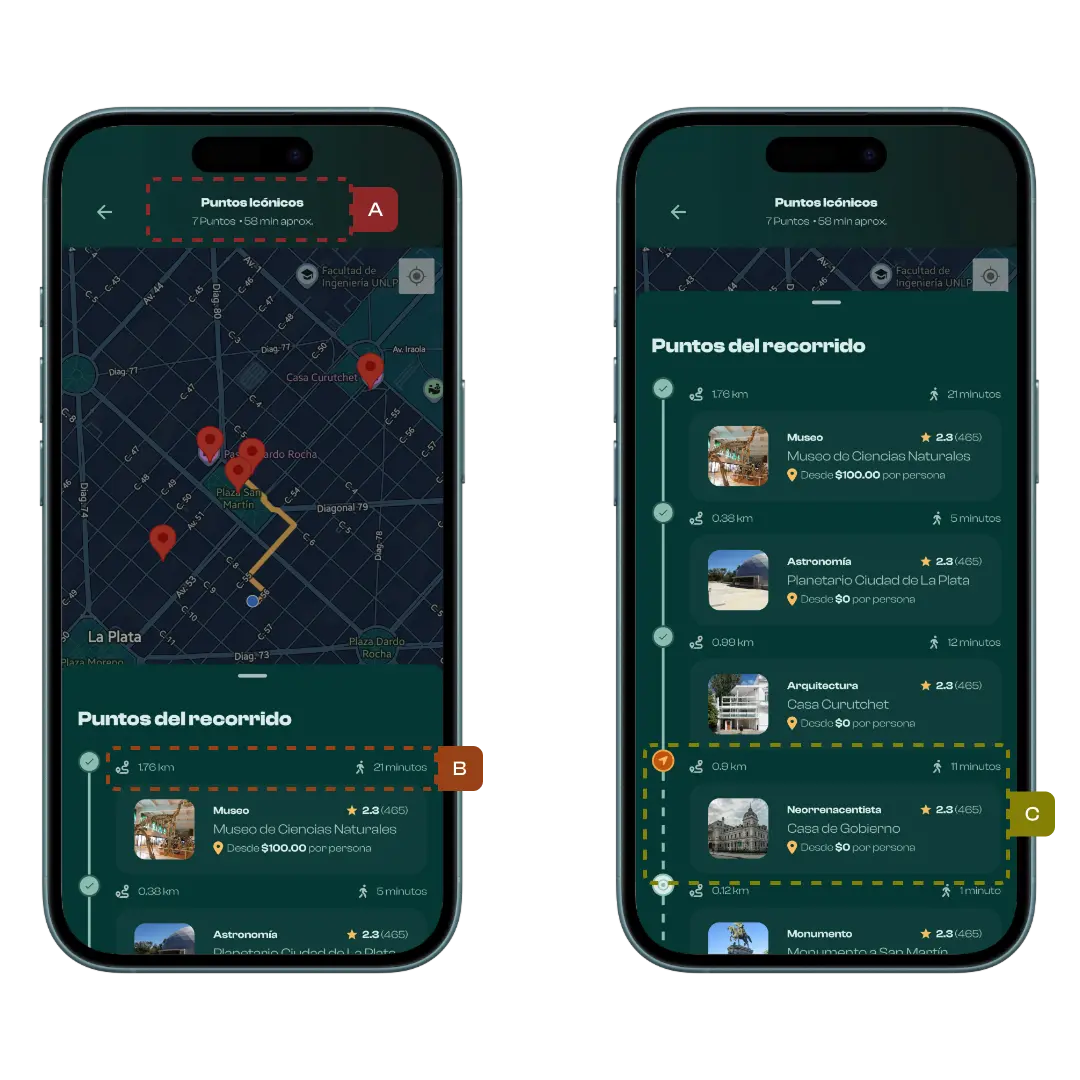
All of this works without a single external API request.
The benefits we got immediately
By avoiding Google Maps for these calculations, we gained:
- ⚡ Instant feedback — no network delays
- 💰 No cost per user — zero API bills
- 📴 Offline compatibility — works without internet
- 🧩 A simpler architecture — less complexity
- 🧠 Easier reasoning about distance-based rules
Is it perfectly accurate? No — and that’s fine.
Haversine calculates straight-line distance, not the exact path through streets.
In most cities, that could be a significant limitation.
But in La Plata — with its grid layout, diagonal shortcuts, and short walking distances — the difference is small enough to be irrelevant for:
- Distance estimations
- UI feedback
- Game mechanics
- Progress indicators
When precise turn-by-turn navigation is needed, we still rely on a map service.
We just don’t use it everywhere.
Final thoughts
One of the biggest lessons from this decision was:
Good technical choices depend on the city, the product, and the user experience — not just the tools available.
For a walkable city like La Plata, a lightweight mathematical approach turned out to be more efficient, cheaper, and easier to maintain than a full routing service.
If you’re building a location-based app for compact, pedestrian-friendly cities, Haversine might be all you need.
The best solution isn’t always the most complex one.